College can feel like a full-time job even before you count the actual classes.
Between lectures, assignments, group projects, exams, research papers, internships, part-time jobs, and trying to have a life outside school, there never seems to be enough time.
That’s why more students are experimenting with artificial intelligence.
And no, using AI doesn’t have to mean asking a chatbot to do your homework.
The smarter approach is to use AI for the repetitive parts of student life—organizing information, creating study materials, explaining difficult concepts, improving writing, planning projects, and helping you get started when you’re stuck.
In fact, Google’s 2026 research found that 85% of students age 18+ surveyed were using AI, with many using it for schoolwork and understanding difficult concepts.
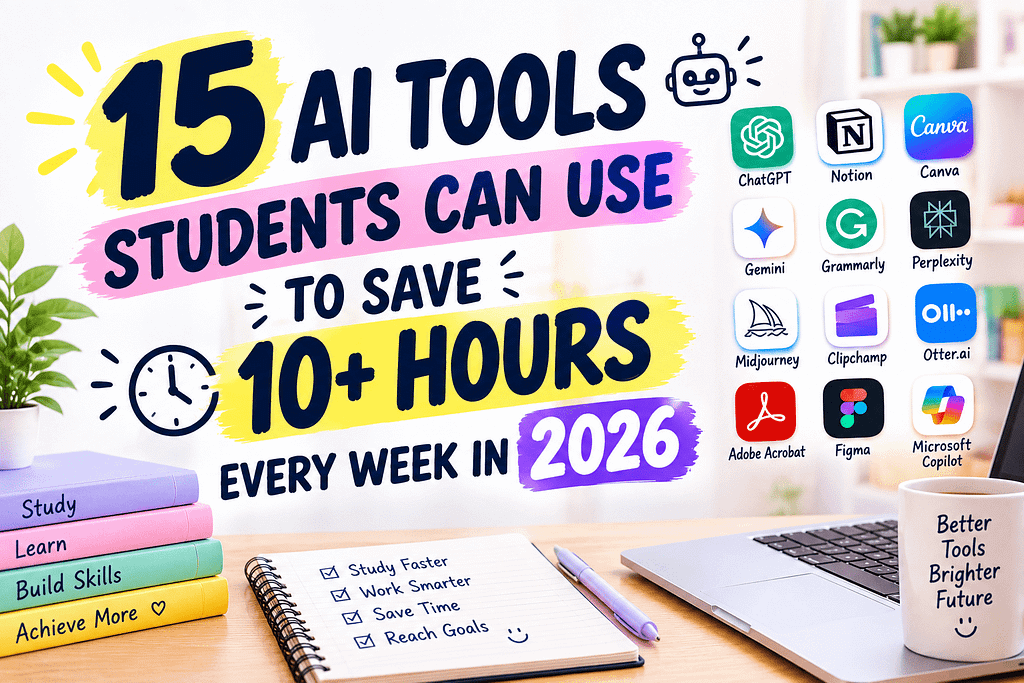
So if you’re trying to make your college schedule a little less chaotic, here are 15 AI tools students can use to save 10+ hours every week in 2026.
1. ChatGPT — Your All-Purpose Study Assistant
ChatGPT can be useful for almost every stage of studying.
You can use it to brainstorm paper ideas, explain difficult concepts in simpler language, create practice questions, organize notes, build study schedules, summarize material, and troubleshoot coding assignments.
The best way to use it is as a tutor rather than an answer machine.
For example, instead of asking:
“Give me the answer to this question.”
Try:
“Explain this concept like I’m learning it for the first time, then give me three practice questions.”
That approach can help you actually learn the material.
2. Google Gemini — Useful for Students in the Google Ecosystem
If your college uses Google Docs, Drive, Gmail, or other Google tools, Gemini can fit naturally into your workflow.
Google has expanded its student-focused AI features in 2026, including study notebooks, personalized learning tools, and interactive ways to work through academic concepts.
You can use Gemini for brainstorming, explanations, study planning, research assistance, and organizing schoolwork.
Eligible college students in the U.S. may also have access to a 2026 Google AI student offer, depending on eligibility.
Best for: Students already using Google Workspace.
3. Gemini Notebook — Turn Your Notes Into a Study Partner
One of the more interesting student tools in 2026 is Gemini Notebook.
You can upload course materials and use them to create summaries, study guides, quizzes, flashcards, and other learning resources. Google says the tool is grounded in the sources you provide and can provide inline citations back to those materials.
Imagine uploading your lecture notes before an exam and asking:
“Create a 20-question practice quiz based only on these notes.”
That’s much more useful than rereading the same pages five times.
Best for: Exam preparation, lecture notes, textbooks, and research.
4. Grammarly — Finish Papers With Fewer Editing Headaches
Writing assignments can take forever when you’re constantly fixing grammar, sentence structure, and awkward wording.
Grammarly can provide writing suggestions, clarity improvements, citation support, and other AI-powered writing assistance for students.
Use it after you’ve written your own ideas.
For example, ask:
- Is this paragraph clear?
- Does my argument make sense?
- Is my tone appropriate for an academic paper?
- Are there obvious grammar problems?
That keeps your own voice at the center while using AI as an editor.
5. Canva — Create Presentations Faster
Group presentations can consume an unbelievable amount of time.
Canva can help students create presentations, documents, visual projects, posters, resumes, and other academic materials. Its student offering also includes AI-powered design features and collaboration tools.
Instead of spending an entire evening fighting with PowerPoint formatting, you can focus more of your time on the actual content.
Best for: Presentations, posters, group projects, resumes, and visual assignments.
6. NotebookLM — Make Long Reading Less Overwhelming
Students regularly receive dozens of pages of reading.
NotebookLM can help you work with your own source material by generating summaries, answering questions about documents, and helping you identify important ideas.
It’s especially useful when you have several papers or lecture documents covering the same topic.
Instead of asking:
“What is this topic?”
You can ask:
“Compare the main arguments across these three papers.”
That makes your reading time more productive.
7. Notion AI — Organize Your Entire Semester
Your academic life can get messy quickly.
One class has a syllabus in Google Drive. Another has deadlines in Canvas. Your professor sends announcements through email. Your group project has its own chat.
Notion AI can help students organize notes, tasks, project information, and planning in one workspace.
You can create pages for:
- Each class
- Assignment deadlines
- Exam dates
- Study plans
- Project tasks
- Internship applications
The goal isn’t to build a complicated productivity system.
It’s to stop important information from living in ten different places.
8. Perplexity — Research With Faster Starting Points
Researching a topic from scratch can take hours.
Perplexity can help students explore a topic, find sources, compare information, and identify questions worth researching further.
It’s particularly useful during the early stage of an assignment.
For example:
“Give me an overview of the causes of the 2008 financial crisis and identify reliable sources I should investigate.”
Then open and read the actual sources yourself.
Don’t treat an AI summary as your final academic source.
Use it to speed up discovery.
9. Otter.ai — Stop Trying to Write Every Word
Trying to listen to a lecture while writing down everything the professor says is exhausting.
AI transcription tools such as Otter can help convert spoken discussions or recordings into searchable text, where permitted.
That means you can concentrate more on understanding the lecture instead of trying to type every sentence.
Afterward, you can review the transcript and turn important sections into your own study notes.
Always check your school’s recording policies and get appropriate permission before recording other people.
10. Quizlet AI — Turn Studying Into Practice
Reading notes feels productive, but testing yourself is often more useful.
Quizlet’s AI-powered features can help students create study materials such as flashcards and practice questions from learning content.
Instead of spending hours manually creating cards, you can start with an AI-generated set and then edit it.
That gives you more time to actually practice.
Best for: Vocabulary, definitions, formulas, exam review, and memorization-heavy subjects.
11. Wolfram Alpha — Useful for Math and Science
Some students don’t need another writing assistant.
They need help understanding math.
Wolfram Alpha can be useful for mathematical calculations, equations, graphs, statistics, and scientific concepts.
But there’s an important rule:
Don’t just copy the result.
Use the output to understand how the problem works.
Ask yourself:
“Could I solve a similar problem without the tool?”
If the answer is no, spend more time learning the process.
12. GitHub Copilot — Helpful for Coding Students
Computer science and data science students can spend hours debugging one small problem.
GitHub Copilot can help developers write code, understand code, generate suggestions, and work through programming tasks.
It’s especially useful when you’re stuck on repetitive code.
But students should still understand what the generated code does.
A professor may ask you to explain your project during a presentation or viva. If AI wrote everything, you may struggle to explain your own submission.
Use AI to accelerate learning—not replace it.
13. Otter + AI Notes — Turn Meetings Into Action Items
Student life isn’t only lectures.
You may also have:
- Club meetings
- Group projects
- Internship meetings
- Research discussions
- Career events
AI note-taking tools can help turn long conversations into summaries and action items.
For a group project, this can be especially useful.
Instead of:
“What did everyone agree to do?”
You have a clear list of responsibilities to review.
Again, make sure everyone involved is comfortable with recording or transcription.
14. Adobe Acrobat AI Assistant — Ask Questions About PDFs
Students deal with PDFs constantly.
Research papers. Textbooks. Course handouts. Reports. Journals.
Adobe’s AI features can help users work with documents more efficiently by asking questions about PDF content and generating summaries.
Instead of searching manually through a long document, you can ask focused questions such as:
“What are the three main findings in this paper?”
Then verify the information against the original document.
This can be a major time saver during research-heavy semesters.
15. Microsoft Copilot — Useful for Office-Based Assignments
If your college uses Microsoft Word, PowerPoint, Excel, or Teams, Microsoft Copilot can be useful for everyday academic work.
Students can use AI assistance for brainstorming, writing, presentations, data-related tasks, and organization.
For example, if you’re working on a presentation, AI can help you turn a rough outline into a more structured starting point.
You should still customize the final presentation so it reflects your own understanding and style.
Can AI Really Save Students 10+ Hours a Week?
Potentially—but don’t treat 10+ hours as a guarantee.
Your actual savings will depend on your schedule, major, workload, and how much repetitive work you normally do.
A student who spends five hours every week creating notes manually may save significant time with better note-taking tools.
Someone writing several research papers may save time with AI-assisted research and editing.
A computer science student may save time debugging or generating repetitive code.
The important thing is to measure your own results.
Try this:
Week 1: Track how long common tasks take.
Week 2: Introduce one or two AI tools.
Week 3: Compare your time.
You may discover that you’re saving 3 hours, 7 hours, or even more.
How to Use AI Without Hurting Your Grades
The biggest mistake students can make is using AI to avoid learning.
Before using any AI tool, check your professor’s or school’s AI policy.
Some instructors allow AI for brainstorming and editing. Others may restrict or prohibit it for certain assignments.
Also remember:
AI can be wrong.
Check facts, calculations, citations, quotations, and references before submitting academic work.
Most importantly, don’t submit AI-generated work as your own when your instructor’s rules don’t allow it.
The goal is to become a better student, not simply a faster copy-and-paste machine.
A Simple AI Student Workflow
You don’t need all 15 tools.
Start with three.
For studying:
Use ChatGPT, Gemini, or Gemini Notebook.
For writing:
Use Grammarly.
For presentations:
Use Canva.
For research:
Use NotebookLM or Perplexity.
For coding:
Use GitHub Copilot.
For organization:
Use Notion AI.
Build your system slowly.
One useful AI workflow can save more time than downloading 20 apps you never actually use.
Final Thoughts
The best AI tools students can use to save 10+ hours every week aren’t necessarily the newest or most expensive tools.
They’re the ones that remove repetitive work from your schedule while helping you learn faster.
Use AI to turn notes into practice questions.
Use it to organize a messy project.
Use it to improve a draft you’ve already written.
Use it to explain something you don’t understand.
Use it to create a study plan when your semester feels overwhelming.
But keep your own brain involved.
Your professors aren’t just grading the final answer. They’re trying to help you develop knowledge, judgment, communication skills, and problem-solving ability.
AI should give you more time to build those skills—not less.
For students in 2026, the real advantage isn’t simply knowing how to use AI.
It’s knowing when to use it, how to check it, and how to turn the time saved into better learning.
That is the kind of productivity Earnify05 believes is actually worth pursuing.
Frequently Asked Questions
What are the best AI tools for students in 2026?
Some of the most useful options include ChatGPT, Gemini, Gemini Notebook, NotebookLM, Grammarly, Canva, Notion AI, Perplexity, Quizlet, Wolfram Alpha, GitHub Copilot, Otter, Adobe Acrobat AI Assistant, and Microsoft Copilot.
Can AI really save students 10 hours a week?
It can, depending on how much repetitive work a student has. However, 10+ hours should be treated as a possible target rather than a guaranteed result.
Is it okay for students to use AI for homework?
It depends on the assignment and your school’s or professor’s policy. Students should always follow their instructor’s rules and disclose AI use when required.
Which AI tool is best for studying?
There isn’t one answer for everyone. ChatGPT and Gemini are useful general-purpose study assistants, while Gemini Notebook and NotebookLM are particularly useful for working with your own course materials.
Can AI tools replace studying?
No. They can make studying more efficient, but students still need to understand and practice the material. Depending entirely on AI can actually make learning weaker.
Are there free AI tools for college students?
Yes. Many AI tools offer free plans or student/education access. For example, Google announced student offers and expanded study features in 2026, while some education versions of its tools are available at no cost depending on the account and institution.