Growing a YouTube channel can feel frustrating.
You spend hours planning a video, write the script, record everything, edit late into the night, create a thumbnail, publish it—and then the video barely moves.
I’ve been there.
The problem isn’t always the quality of the video. Sometimes the bigger issue is the process behind it.
Artificial intelligence has changed that process.
Instead of using AI to completely replace creativity, creators can use it to speed up research, organize ideas, improve scripts, analyze audience behavior, and make repetitive editing tasks easier.
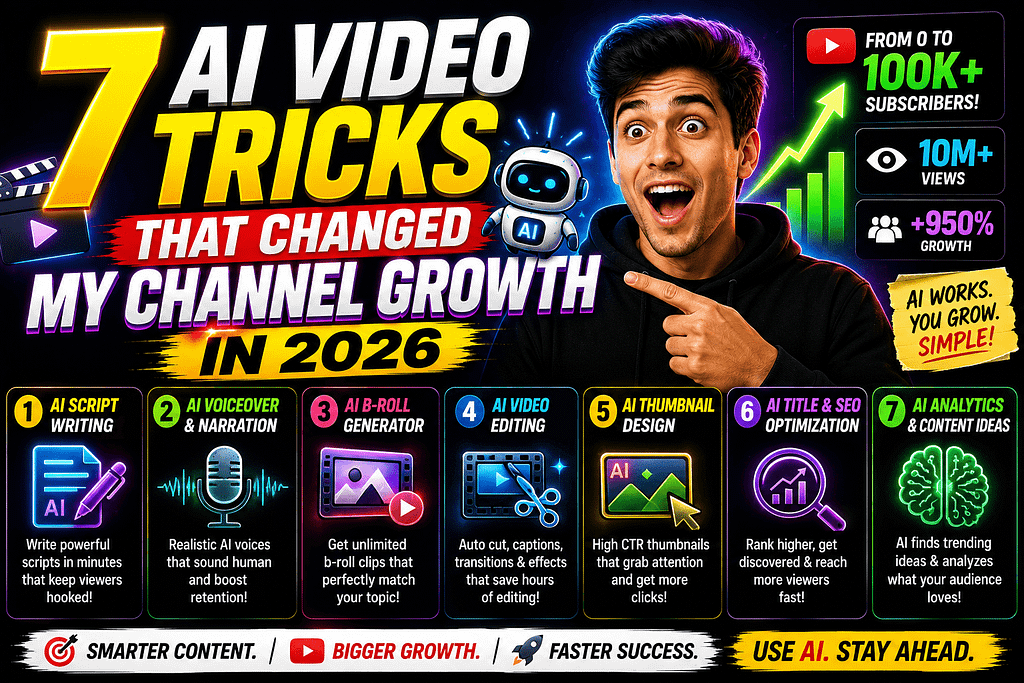
That was the biggest lesson behind these AI Video Tricks That Changed My Channel Growth.
AI didn’t magically make videos successful. It helped make the workflow smarter.
And that’s an important distinction.
YouTube itself says that recommendation performance is influenced by how viewers respond to content, including appeal, engagement, and satisfaction.
So the goal isn’t to create more videos just because AI makes production faster.
The goal is to create better videos for the right audience.
Here are seven AI-powered tricks worth trying in 2026.
1. Use AI to Find Better Video Ideas
One of the hardest parts of YouTube isn’t editing.
It’s deciding what to make next.
You can spend an hour staring at a blank document trying to think of an idea.
AI can make that process much faster.
Instead of asking:
“Give me YouTube video ideas.”
give AI more context.
For example:
“Give me 20 YouTube video ideas for a U.S. audience interested in personal finance and AI productivity. Focus on specific problems beginners are trying to solve. Make each idea useful enough to create a 7–10 minute video.”
Now you have a starting point.
But don’t blindly publish the first idea AI gives you.
Look at your own analytics, audience questions, comments, search behavior, and competing content.
YouTube’s Audience analytics can also show what other content your viewers watch, which can help you identify topics and potential collaborations.
The Trick
Use AI as a brainstorming partner, not as your final decision-maker.
You know your audience better than a generic prompt does.
2. Turn One Idea Into a Stronger Script
A common problem with AI-generated scripts is that they can sound incredibly generic.
Every sentence feels polished.
And somehow, none of it sounds like a real person.
Instead of asking AI to write the entire video, use it to improve the structure.
Start with your own idea.
Then ask AI to help organize it into:
- Hook
- Problem
- Context
- Main points
- Examples
- Story
- Conclusion
- Call to action
This gives your video a natural flow without removing your personality.
A Simple Hook Formula
Try:
Problem → Curiosity → Promise
For example:
“I spent months trying to grow my YouTube channel, but I was making one mistake that had nothing to do with video quality. Here’s what I changed—and why my entire workflow became easier.”
The hook gives viewers a reason to continue.
YouTube specifically recommends making the opening match the promise made by the title and thumbnail.
3. Use AI to Create Better Titles
Your video can be fantastic.
But if nobody clicks, very few people will discover it.
That’s why titles matter.
AI can help you generate multiple variations quickly.
For example, instead of publishing:
“AI Tools for YouTube”
you could brainstorm alternatives such as:
“7 AI Tools That Completely Changed My YouTube Workflow”
“I Used AI to Run My YouTube Workflow for 30 Days”
“7 AI Tricks I Wish I Knew Before Starting YouTube”
Then choose the title that accurately represents the actual video.
Don’t use misleading clickbait.
YouTube recommends titles that are accurate, concise, and representative of the content.
My Rule
Generate 20 titles.
Delete the weakest 15.
Compare the remaining five.
Then choose the one that creates curiosity without making a promise the video can’t deliver.
4. Use AI to Improve Your Thumbnail Concepts
Your thumbnail is often the first visual interaction someone has with your video.
AI can help you brainstorm different visual concepts before you actually design the final thumbnail.
For example, you could ask:
“Create five thumbnail concepts for a video about AI tools that help YouTubers save time. Keep the design simple and make the main idea understandable on a mobile screen.”
You can then take the best concept and create the actual thumbnail using your preferred design software.
Don’t overcrowd it.
One strong idea is usually better than five competing ideas.
YouTube notes that 90% of its best-performing videos have custom thumbnails, and it recommends keeping thumbnail designs clear and easy to understand.
A Simple Thumbnail Formula
Try:
One face or object + one emotion/action + 2–4 words
For example:
“AI CHANGED EVERYTHING”
with a clear visual showing the transformation.
5. Turn Long Videos Into Shorts
This is one of my favorite AI video tricks.
Suppose you spend an hour creating a YouTube video.
Why should that become only one piece of content?
With AI-assisted editing and transcription, you can identify useful moments and turn them into shorter clips.
One long video could potentially become:
- 3 YouTube Shorts
- 2 Instagram Reels
- Several social posts
- A newsletter idea
- A blog article
- Multiple quote graphics
The key is not to blindly cut random sections.
Look for moments containing:
- A surprising statement
- A useful tip
- A strong opinion
- A quick tutorial
- A mistake
- A story
- A memorable result
Then edit those moments so they work independently.
This gives your content more opportunities to reach new viewers.
6. Use AI to Improve Audience Retention
Getting a click is only half the battle.
The viewer has to stay.
YouTube’s retention reports can show where viewers are dropping off, where they are rewatching sections, and which moments hold attention particularly well.
This is where AI can become useful.
Take your retention data and ask:
“What could cause viewers to leave around this point in the video?”
Then examine the actual footage.
Maybe you’re:
- Repeating yourself
- Taking too long to reach the point
- Showing an unnecessary introduction
- Using a long transition
- Explaining something that could be demonstrated
- Changing topics too suddenly
AI can suggest possibilities, but your analytics provide the evidence.
One Important Trick
If your most interesting moment appears at minute six, don’t automatically save the good stuff for the end.
Consider bringing part of that idea earlier.
YouTube’s retention guidance specifically recommends examining top moments and considering whether compelling material can be introduced earlier.
7. Build an AI-Powered Content System
This was probably the biggest change.
Instead of treating every video like a completely new project, create a repeatable workflow.
For example:
Monday — Research
Find questions, trends, comments, and content opportunities.
Tuesday — Ideation
Use AI to brainstorm angles and organize your research.
Wednesday — Script
Create the outline and write the first version.
Thursday — Production
Record the video.
Friday — Editing
Edit the long-form video and identify Shorts.
Saturday — Packaging
Create titles, descriptions, thumbnail concepts, and social posts.
Sunday — Analytics
Review the performance of previous videos.
Now you’re not relying on inspiration every day.
You have a system.
And AI can assist at several points without becoming the creator.
YouTube’s current creator guidance similarly emphasizes ideation, packaging, audience engagement, and analytics rather than simply uploading as frequently as possible.
What AI Should NOT Do for Your Channel
There’s a temptation to automate everything.
I wouldn’t.
Your personality is an advantage.
AI can help with:
Research → Organization → Brainstorming → Editing assistance → Repurposing → Analysis
But you should still control:
Your opinion → Your story → Your experience → Your final message → Your creative direction
If every channel uses AI to generate the same type of script, the creators who sound like actual humans will stand out.
AI should make your content creation faster, not make your content generic.
A Simple AI YouTube Workflow for Beginners
If you’re just starting, don’t download 25 AI tools.
You probably don’t need them.
Start with a simple system.
Step 1: Find a Problem
What does your audience want to know?
Step 2: Research It
Use YouTube search, comments, analytics, and reliable sources.
Step 3: Brainstorm
Use AI to generate different angles.
Step 4: Write
Create the script in your own voice.
Step 5: Record
Don’t wait for perfect equipment.
Step 6: Edit
Remove unnecessary pauses and repetitive sections.
Step 7: Package
Create an accurate title and compelling thumbnail.
Step 8: Analyze
Look at impressions, clicks, watch time, and retention.
Step 9: Repeat
Use what you learned to improve the next video.
That last step matters more than any individual AI tool.
Common AI YouTube Mistakes
Using AI Without Editing
Raw AI content often sounds repetitive.
Always review and personalize it.
Chasing Every Trend
A trend is useless if it doesn’t fit your audience.
Making Clickbait Titles
A click isn’t valuable if the viewer immediately leaves because the video didn’t deliver.
Overediting
Fast cuts aren’t automatically engaging.
Edit for clarity.
Publishing Random Topics
A clear channel identity makes it easier for viewers to understand what they can expect.
Ignoring Analytics
Don’t guess when your channel already has data.
Use it.
Frequently Asked Questions
Can AI really help grow a YouTube channel?
Yes, AI can assist with ideation, scripting, editing, repurposing, research, and analysis. But AI itself doesn’t guarantee channel growth. Viewer response to the finished content remains critical.
What is the best AI trick for YouTube beginners?
Start with idea generation and content planning. A strong topic can save you from spending hours producing a video that your target audience doesn’t care about.
Can AI make YouTube thumbnails?
AI can help generate concepts or visual assets, while design tools can be used to create the final thumbnail. Always make sure the final image accurately represents your video.
Should I use AI to write my entire YouTube script?
You can, but it’s usually better to use AI as an assistant. Add your own examples, experiences, opinions, and storytelling so the video sounds authentic.
How can I use AI for YouTube Shorts?
AI-assisted transcription and editing can help identify interesting moments from long-form videos and turn them into shorter clips. Each Short should still be edited for the Shorts format rather than simply copied from the original.
Conclusion
The biggest lesson from these AI Video Tricks That Changed My Channel Growth is simple:
AI isn’t the growth strategy. It’s the accelerator.
A creator still needs to understand the audience, choose useful topics, make an accurate promise, deliver value, and study what viewers actually do.
Use AI to brainstorm faster.
Use it to organize your research.
Use it to experiment with titles and thumbnail concepts.
Use it to repurpose long-form content.
Use analytics to understand what worked.
Then repeat the process.
YouTube’s recommendation system looks at viewer response, including whether people choose to watch, stay engaged, and feel satisfied with the content.
So don’t chase the idea of creating 100 videos with AI.
Create better videos with a smarter system.
That’s the approach Earnify05 recommends for creators who want to build a sustainable channel in 2026.